Quick Answer
Can a Wi-Fi driver make a laptop freeze and restart?
Yes. In this Acer Nitro V 15 repair, several Windows crash dumps repeatedly implicated the MediaTek wireless driver mtkwl6ex.sys. After a Wi-Fi driver update, the laptop remained stable beyond its usual roughly 24-hour crash window. That result supported a driver-related diagnosis, but random restarts can also involve other drivers, RAM, heat, storage, or power. The symptom alone does not prove the Wi-Fi card is defective.
Get help with a freezing or restarting laptop in DavisA client brought NorthCore an Acer Nitro V 15 that would freeze on whatever was on screen, then suddenly restart. It could work for an extended period before failing, typically after around 24 hours or more of use. A quick startup check would have missed the problem entirely.
The eventual lead came from the laptop's Windows crash dumps: the same MediaTek Wi-Fi driver appeared repeatedly. Updating that driver brought the system past the point where it had previously crashed. This case shows why a wireless problem can deserve investigation even when the complaint is a whole computer freezing, rather than simply losing its internet connection.
The Laptop and the Intermittent Crash
| Component or symptom | What we recorded |
|---|---|
| Laptop | Acer Nitro V 15, model ANV15-52 |
| Wireless adapter | MediaTek Wi-Fi 6 MT7920 |
| Driver implicated in recurring dumps | mtkwl6ex.sys |
| Installed driver during diagnosis | 3.4.0.1182, dated January 14, 2025 |
| Driver INF on this installation | oem171.inf |
| Reported behavior | Screen froze, followed by a sudden restart after extended use, around 24 hours or more |
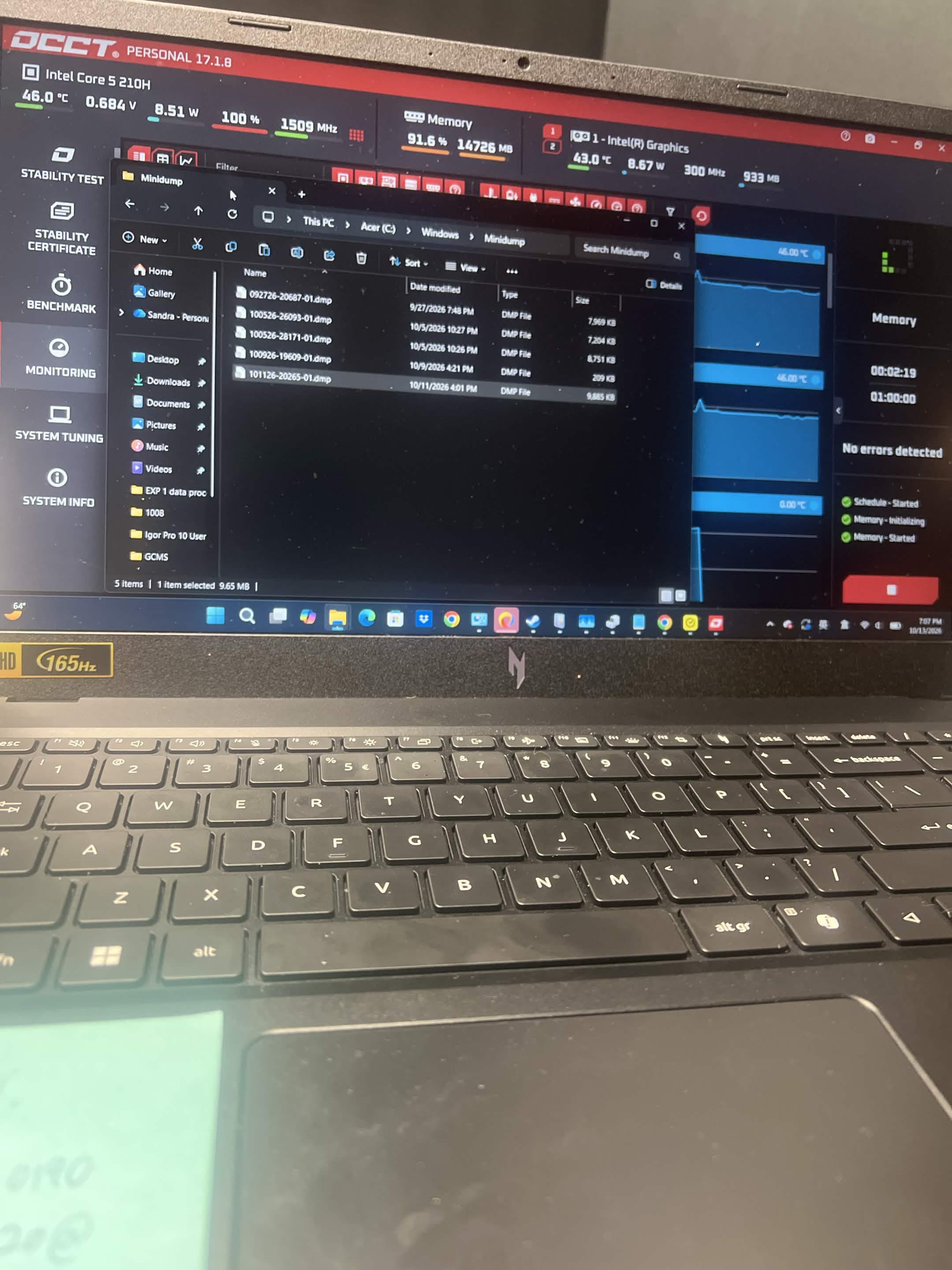
I started with the failure history and Event Viewer, where critical failures were recorded around the crashes. Those records helped establish what had happened, but did not by themselves identify the underlying cause. To investigate further, I reviewed multiple Windows minidumps in WinDbg rather than treating every restart as the same fault.
What the Windows Crash Dumps Revealed
The strongest pattern was DRIVER_IRQL_NOT_LESS_OR_EQUAL, bugcheck 0xD1, involving mtkwl6ex.sys. Across multiple dumps, the MediaTek driver appeared with the same fault offset, 0x12F661. That repetition made the wireless driver a much stronger suspect than a single unexplained restart would have.
Microsoft describes 0xD1 as a driver attempting a memory access at an interrupt level where that access is not permitted. The code alone does not identify a Wi-Fi problem. In this case, it was the recurring driver details in the dump analysis that directed the investigation toward the MediaTek wireless software.
| Crash date in 2026 | Finding from our investigation | What it supported |
|---|---|---|
| September 27 | mtkwl6ex.sys | MediaTek Wi-Fi driver involvement |
| October 5 | MediaTek driver findings and a separate nllWireguard crash | More than one possible software source of instability |
| October 9 | Bugcheck 0x13A with an NVIDIA NVRM pool tag | An inconclusive memory-corruption lead; not proof of a defective GPU |
| October 11 | mtkwl6ex.sys again | Further evidence of the recurring wireless-driver pattern |
A driver appearing in a crash dump is a lead to investigate, not automatic proof that the associated hardware is broken. Repeated findings, the surrounding crash details, and the system's response to a targeted change make the diagnosis more useful.
There Was Also a Separate Norton Driver Crash
One crash involved nllWireguard, associated in our investigation with Norton WireGuard version 1.1.0.197, and bugcheck 0xCE. Microsoft defines that bugcheck as a driver unloading without cancelling pending operations. We treated it as a separate finding rather than assigning every crash to the MediaTek adapter.
The October 9 dump also remained inconclusive. An NVIDIA-related pool tag did not establish a failed graphics processor, and RAM instability had not been ruled out. A laptop can have more than one source of instability, so an explanation needs to account for the evidence without forcing unrelated crashes into one diagnosis.
The Driver Update That Improved Stability
The first installation attempt did not give us a confirmed version change: Device Manager still reported 3.4.0.1182 with the January 14, 2025 date. That was an important checkpoint. Running an installer is not the same as confirming that Windows is using the intended driver.
The successful update used a Wi-Fi driver package sourced from ASUS. After that update, the Acer remained stable past its usual roughly 24-hour crash point, and we used OCCT as part of the stability checks. The observed improvement supported the wireless-driver diagnosis.
The final installed package version and exact total test duration are not recorded here, so this article is a repair account rather than a download prescription. The result describes our observed testing window, not a claim that every future crash or every other dump finding was resolved.
This was a Windows Wi-Fi driver update, not an Acer BIOS flash. An ASUS-sourced package used in one repair is not a blanket recommendation for other Acer laptops. Start with the laptop manufacturer's support options and verify the exact adapter, hardware IDs, Windows version, and package compatibility before considering an alternative.
Did the MediaTek Wi-Fi Card Need Replacing?
We had discussed removing the MediaTek card as an isolation test and considered an Intel Wi-Fi 6E AX210 as a possible replacement, subject to confirming compatibility with this exact laptop. Those were proposed next steps, not the repair outcome described here. Stability improved after the driver update, without establishing that the physical MediaTek card was defective.
That distinction matters if you are researching MT7920 crashes or an mtkwl6ex.sys blue screen. A replacement card should follow diagnosis and a compatibility check. The presence of the same adapter model does not establish that another computer needs the same repair.
What to Check When a Laptop Freezes and Restarts
Wi-Fi drivers are one possible cause among many. At NorthCore, the useful starting point is the pattern: when the failure occurs, what Windows records, what changed recently, and whether the same evidence appears across crashes. For an intermittent fault, the follow-up test also needs to reflect how the machine was failing.
- Record the behavior: a frozen image, blue screen, immediate power loss, and a disconnected network are different observations.
- Note how long the computer was running, the workload, and whether the crash followed sleep, a network change, or a recent update.
- Preserve available crash dumps and review them alongside the event history before changing multiple components.
- Identify the exact adapter and installed driver. Verify the active version after an installation and restart.
- Investigate other dump findings separately instead of assuming every failure has the same cause.
- Retest beyond the usual failure window with relevant everyday use and appropriate stability checks. A short clean test cannot settle a fault that normally takes a day to appear.
OCCT was part of our testing, but a memory stress test alone does not validate every Wi-Fi operation or exclude every hardware problem. The important result in this case was the change in observed stability after addressing the recurring driver lead.
Questions About Wi-Fi Drivers and Random Restarts
Can Wi-Fi Be Involved Even If the Internet Was Working?
Yes. This client's reported symptom was the laptop freezing and restarting, not simply a dropped connection. The crash dumps are what brought the wireless driver into the investigation. Working internet access before a crash does not by itself clear the driver.
Does This Mean All MediaTek MT7920 Adapters Are Bad?
No. This case documents one laptop, its installed driver, recurring dump findings, and its response to an update. It does not establish a failure rate for MediaTek adapters or an industry-wide increase in Wi-Fi-related crashes. It does show why wireless drivers belong on the troubleshooting list when the evidence points that way.
Help With Laptop Freezes and Random Restarts in Davis
NorthCore diagnoses laptop and desktop freezes, blue screens, driver problems, and hardware instability in Davis, CA. This repair is an example of the work: review the crash evidence, identify a targeted change, and test whether the original symptom returns before recommending replacement hardware.
If your computer keeps freezing or restarting, tell us the model, how often it happens, any error message, and what you have already tried. Bring the device in by appointment or ask about pickup and return delivery. Whether the cause is a wireless driver or something else, we can investigate it and explain the next repair options.
For random freezes, blue screens, and driver troubleshooting in Davis, explore NorthCore's laptop repair and computer repair.